Affiliate disclosure: LatenciaCero is a participant in the Amazon Associates Program. The product links on this site are affiliate links, and if you buy through them we earn a commission at no extra cost to you. Amazon and the Amazon logo are trademarks of Amazon.com, Inc. or its affiliates.
Technical benefits: what it actually gives you
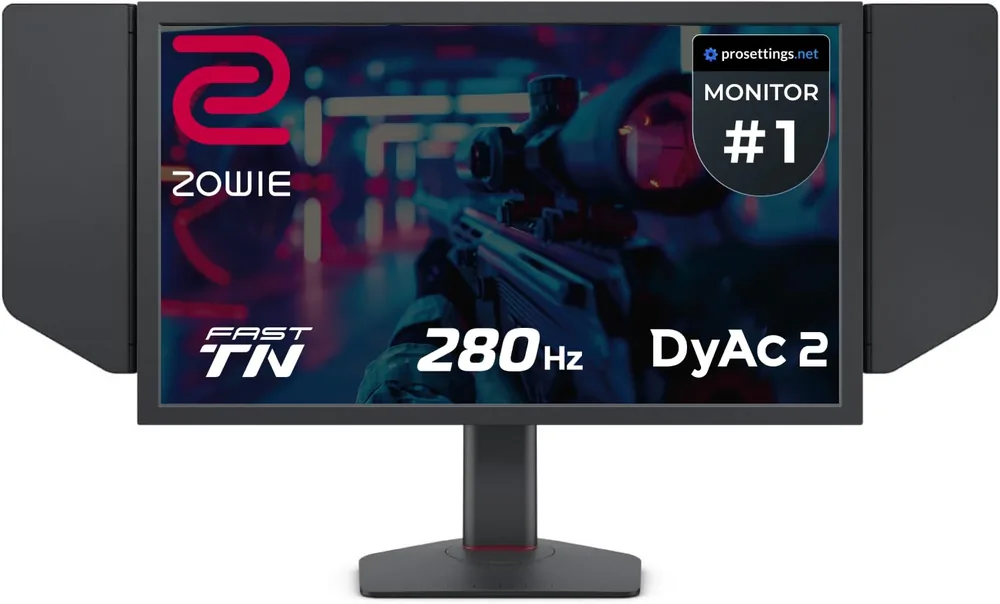
280 Hz: a new frame every 3.57 ms
At 60 Hz you see a new image every 16.7 ms; at 280 Hz, every 3.57 ms. That difference is pure reaction time: in the worst case the enemy spends 13 fewer milliseconds invisible to you. And the more frames there are, the less ground a target covers between images, so there's less guessing about where it will be.
DyAc 2: strobing light against ghosting
Motion blur on an LCD doesn't only come from the panel: it comes from your eye tracking an object while the pixel stays lit for the whole frame. DyAc 2 strobes the backlight in sync to shorten that sample time, and the result is that an AK spray reads as separate lines instead of a smear. It's why there are still CS2 professionals on TN with OLED available.
Fast TN: the quickest panel at pixel level
Modern TN changes state faster than IPS and without the overshoot that produces inverse ghosting. You give up viewing angles and colour against an OLED, but this is a monitor built to be stared at from 60 cm and win duels, not to watch films on.
Editor's rating
Precision10/10
Response speed9/10
Ergonomics9/10
Build quality8/10
Value for money6/10
Scores from 0 to 10 assigned by our editors from the spec sheet and compared within each category. These aren't manufacturer figures: they're our judgement. You can read the method in how we choose.
Full spec sheet
Panel & image
Diagonal
24.1 "
Panel type
Fast TN
Finish
Matte
Resolution
1920 x 1080 (Full HD)
Brightness
320 nits
Contrast
1000:1
DCI-P3 coverage
—
HDR
No
Speed & latency
Refresh rate
280 Hz
Frame duration
3.57 ms
Response time (GtG)
0.5 ms
Motion blur reduction
DyAc 2 (dual backlight)
Adaptive sync
FreeSync
Connections & ergonomics
Video ports
DisplayPort + HDMI
Stand adjustments
Height, tilt, swivel and pivot; side shields included
Competitive extras
DyAc 2, XL Setting to Share, S-Switch
Weight
9.2 kg
Other
Warranty
3 years
Other listing details
Colour coverage
98% (sRGB) per the Amazon listing
USB ports
USB 2.0 for the S-Switch
Format
16:9 flat
Mounting
VESA compatible
Fields with no data show as “—”: it means neither Amazon nor the manufacturer publishes that figure. We'd rather leave it empty than estimate it.
How it performs by game type
Tactical shooters
Valorant · CS2
10/10
This is literally the CS2 monitor, and much of Valorant too. 280 Hz at 1080p is the combination a mid-range PC can sustain with frames to spare, and DyAc 2 keeps the enemy's head sharp while you flick. 24 inches also keeps all the information in one glance without moving your eyes.
Mechanical speed and precision
Rocket League
9/10
Rocket League is constant camera work with a small, fast-moving object, and DyAc 2's motion clarity helps read the ball's path on aerials. What you lose is colour and contrast against an OLED — secondary when what matters is seeing the ball.
High click-rate PvP
Minecraft
7/10
It works perfectly for PvP and rules out the burn-in risk of an OLED with a permanently fixed HUD. But Minecraft is a very visual game, and 1080p on TN looks flat next to any OLED on this list.
Mixed competitive play
Roblox
8/10
In Roblox shooters it performs as well as it does in CS2, and the hardware needed to push 280 fps is modest. Downside: 1080p at 24 inches feels tight if you also use the machine to study, edit or watch content.
Pros, cons and who it's for
Strengths
Genuine 280 Hz with DyAc 2, the best motion-blur control on an LCD
Fast TN at 0.5 ms GtG: no overshoot, no inverse ghosting
Fully adjustable stand with side shields included
S-Switch and XL Setting to Share to copy pro settings
Three-year warranty
Weaknesses
1080p is low resolution in 2026 outside of competing
Colour and viewing angles well behind an OLED
No real HDR: 320 nits and 1000:1 contrast
Expensive for what it offers if you don't play tactical shooters
Ideal for: The CS2 or Valorant player who wants the monitor the professionals use and puts motion clarity above everything else.
Almost all the reviews come from FPS players arriving from 144-170 Hz monitors who describe easier recoil control and a cleaner image in motion. The idea that 'the pros use it for a reason' comes up repeatedly. Critical comments note that going from 170 to 280 Hz is a less dramatic jump than going from 60 to 144.
Our own synthesis based on published opinions about the product. We don't reproduce third-party reviews.